Miniature Hands Build a Real Building: Video Prompt
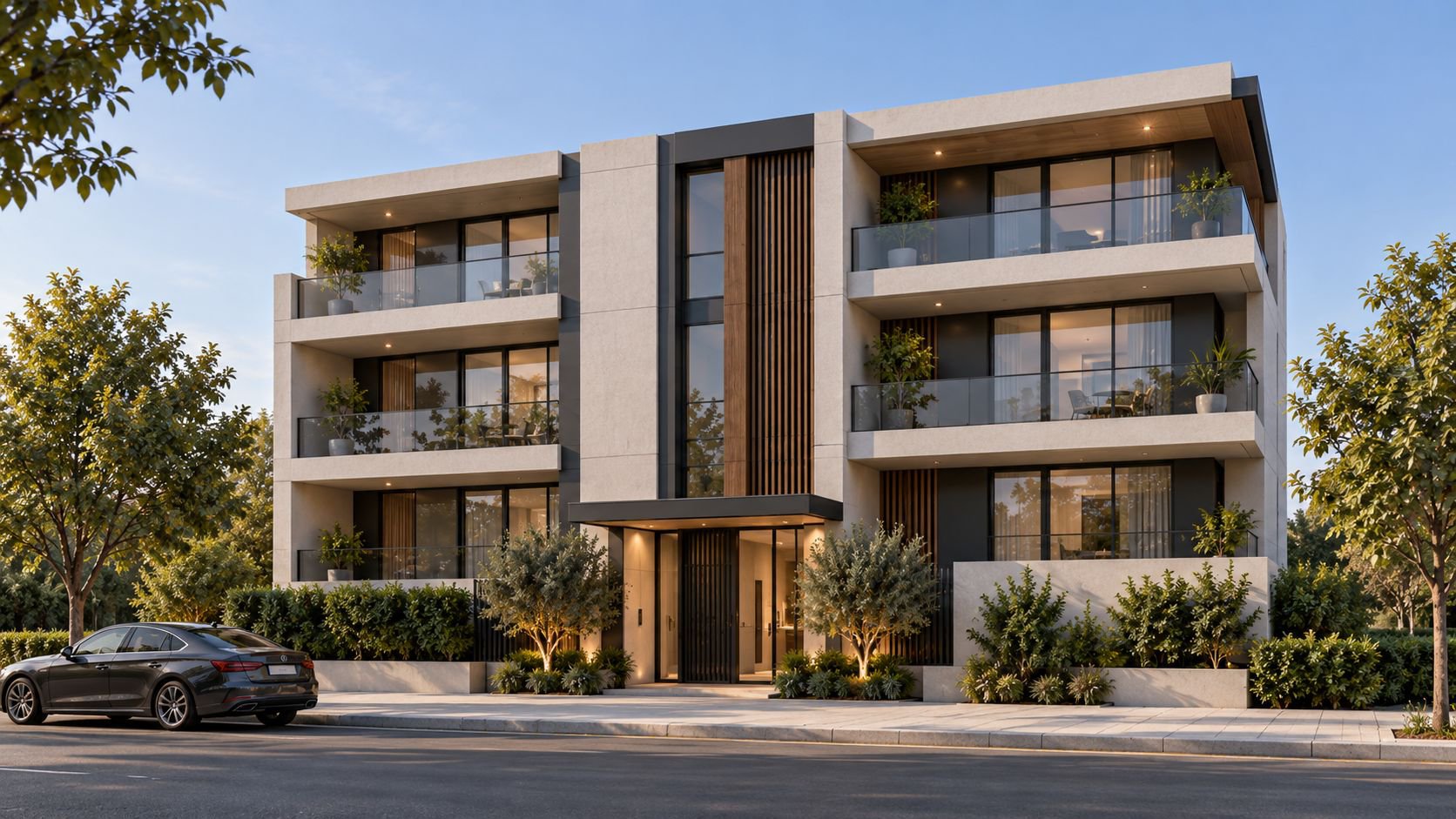
Matte-black gloved hands assemble a four-storey apartment building at miniature scale until it becomes the full-size finished home.
Start and end frames
Free master prompt
If your browser blocks copying, select the complete text below.
Create a 10-second ultra-photorealistic cinematic architectural build sequence in 16:9, using the uploaded reference image as the ABSOLUTE FINAL FRAME.

CRITICAL FINAL-FRAME RULE: the uploaded image is the locked target. At the end of the 10-second video, the completed building, facade geometry, proportions, floors, balconies, windows, materials, colors, landscaping, lighting, camera angle, perspective, framing and composition MUST match the uploaded image EXACTLY. Do not redesign, reinterpret, simplify, replace or modify any visible element. The final frame MUST be visually identical to the input image.

Keep the same building and site throughout. Use realistic daylight, natural shadows and only the materials already visible in the reference. Only masculine hands wearing matte-black gloves appear during construction.

0.0–0.6: extreme macro shot; one finger draws a straight line through sand, exposing the exact footprint of the concrete foundation.

0.6–1.3: a hand places the first structural concrete core; columns, beams and the structural grid mechanically assemble outward.

1.3–2.0: two fingers lift upward; floor slabs, columns and structural levels rise sequentially and lock precisely into position.

2.0–2.7: a hand physically shifts the upper volumes into their exact positions, creating the terraces, setbacks and balconies seen in the uploaded image; short controlled camera orbit.

2.7–3.4: a hand sweeps across the exposed structure; the exact facade materials from the reference mechanically install across the building, including wall surfaces, metal elements, glazing, windows and balcony details.

3.4–4.1: fingers CLICK the final facade panel into position; macro camera glide across the finished facade materials.

4.1–4.8: a finger draws the exterior circulation path; paving, entrance paths and driveway assemble directly behind the movement.

4.8–5.5: a hand installs the main tree and vegetation; the remaining landscaping assembles naturally according to the uploaded reference image.

5.5–6.2: quick hand movements place the remaining exterior details, architectural lighting and vehicles exactly where they belong in the reference.

6.2–7.0: complete the final ground and landscape elements while maintaining realistic physical assembly.

7.0–8.2: fingers make the final precise adjustments; camera pushes through foreground foliage and transitions from miniature construction scale to full real-world scale as the hands disappear.

8.2–10.0: camera emerges into the completed real environment, moves smoothly toward the facade, then returns precisely to the ORIGINAL uploaded-image camera position and framing.

AT 10.0 SECONDS, FREEZE ON THE UPLOADED IMAGE AS THE EXACT FINAL FRAME. Input image = final video frame. Exact same building, exact same geometry, exact same materials, exact same colors, exact same surroundings, exact same perspective, exact same camera position and exact same composition. ZERO visual deviation.

All transformations must feel physical and mechanical: sliding, lifting, assembling, unfolding and locking with realistic mass, contact and shadows. No magic, glow, holograms, LEGO, toys, cranes, workers, text, logos, morphing or spontaneous redesign.
Vertical Reel settings
Duration 10 seconds · vertical 9:16 · 720 × 1280 · 24 fps · reference strength high · final-frame lock high · motion strength medium · hold the exact supplied-image frame at 10.0 seconds · no generated text or logos.
Frequently asked questions
Is this prompt free?
Yes. The complete master prompt is published in full on this page, free to copy and use — no purchase or sign-up is required.
What does this prompt create?
A 10-second video in which matte-black-gloved hands build a miniature four-storey apartment building — plinth, columns, slabs, facade panels and windows — until the model stands complete at full scale, matching the reference image.
How do I use this prompt?
Upload the reference image from this page as the final-frame target in an image-to-video tool such as Veo, Kling or Runway, paste the master prompt, set a vertical 9:16 canvas at 24 fps with a 10-second duration, then generate and compare the last frame with the reference image.
More free prompts
Go further: WORLD ARCH PRO collections
- Cinematic Studio Website System ♛ PRO · Locked
A complete multi-page prompt system covering brand, UX, motion, SEO and conversion states.
- Climate-Responsive Facade Visual Pack ♛ PRO · Locked
A tested family of facade prompts organised by climate, orientation, material and camera.
- Architectural Day-to-Night Motion Pack ♛ PRO · Locked
Camera-safe transitions, interior-light cues and weather variants for short-form video.
- Architectural Logo Motion Suite ♛ PRO · Locked
A coordinated set of grid, line, material and spatial logo reveals for multiple formats.
- Cinematic Architecture Background Pack ♛ PRO · Locked
A coordinated PRO set of loopable material, grid, shadow and spatial backgrounds.