FPV Construction Transformation: Single-Take Video Prompt
One continuous FPV flight through a mechanical construction chain reaction that assembles an eight-storey travertine residence around the camera.
Start and end frames
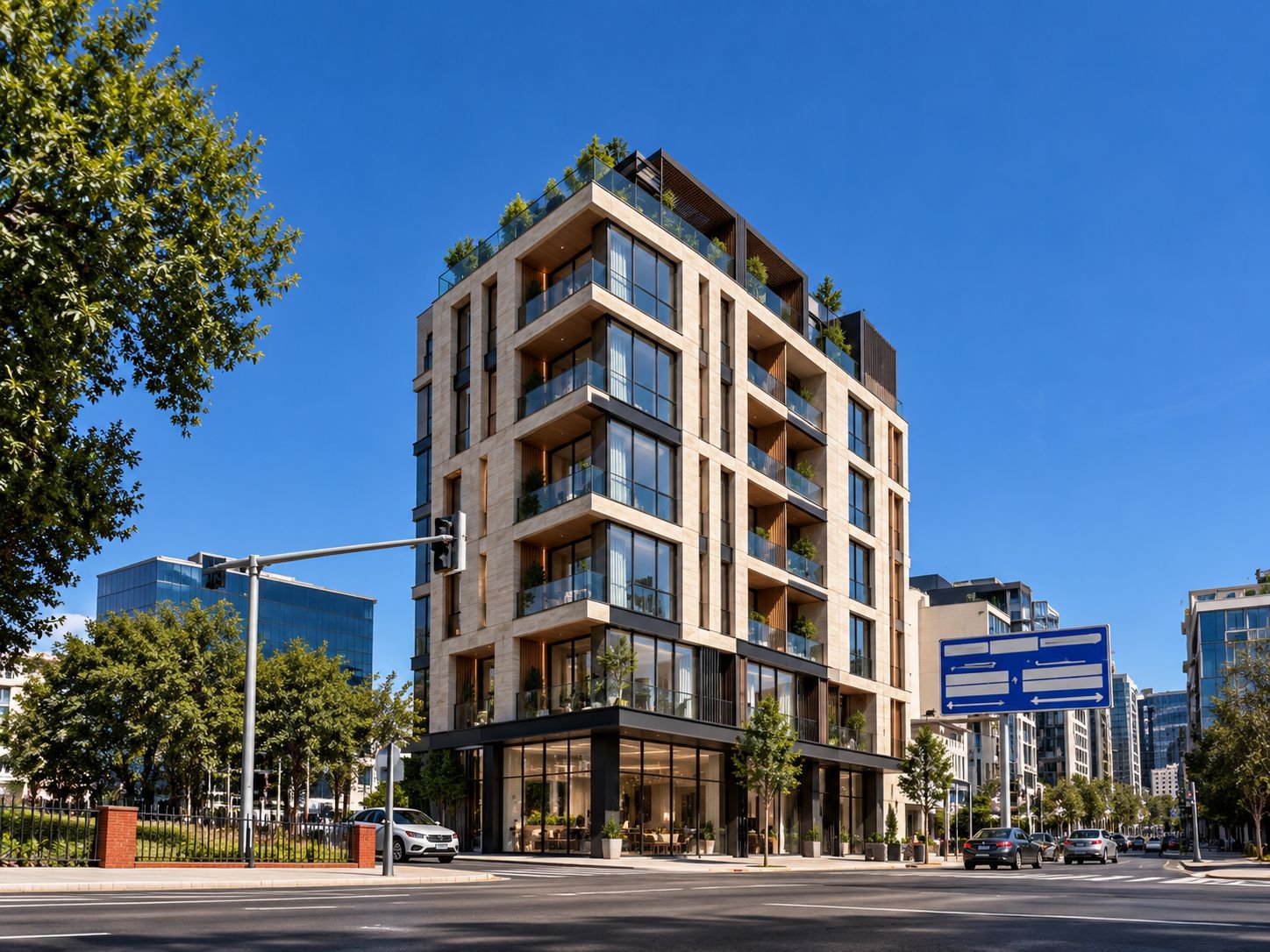
Free master prompt
If your browser blocks copying, select the complete text below.
Create a 10-second high-intensity, single-take FPV construction transformation following the storyboard exactly. Keep one consistent modern building and one consistent construction site from beginning to end. The unfinished structure must gradually evolve into the completed architecture. Treat the entire site as one massive synchronized mechanical system: cranes, steel members, columns, floor plates and facade components activate one another in a continuous chain reaction. Photoreal cinematic construction spectacle, IMAX-scale energy, ultra-wide 14mm FPV perspective, cool steel-toned shadows, warm industrial-orange highlights and aggressive controlled speed ramps. From 00:09 onward, the output must match the uploaded reference image exactly and remain unchanged — same building, same facade, same geometry, same framing, same materials, same final appearance.

00:00–00:01.0 — SYSTEM ACTIVATION
Begin extremely close inside the unfinished structure. A huge industrial steel locking assembly spins rapidly and clamps onto a structural connection. Heavy metal strikes metal as dense orange welding sparks burst past the camera. The lens stays dangerously close and follows the rotation of the mechanism.

00:01.0–00:02.0 — CRANE ROTATION LINK
Continue the exact rotational motion into the movement of a massive tower crane circling the same building. The camera rapidly escapes the structure into an extreme low-angle perspective and accelerates upward. The crane boom sweeps only centimeters above the lens, creating an intense near-collision moment.

00:02.0–00:03.0 — STRUCTURAL BEAM STRIKE
Lock onto a giant suspended steel beam moving rapidly toward the structure. It swings inches past the camera and crashes precisely into position between two structural columns. The impact produces concrete dust, welding sparks and fragments that burst toward the lens. Camera drives directly through the expanding debris.

00:03.0–00:04.0 — COLUMN CHAIN
The beam connection instantly activates the next mechanical sequence. Large concrete columns rise vertically one after another like synchronized industrial pistons. Camera climbs beside them at high speed while each column reaches its exact position and locks before the following column activates.

00:04.0–00:05.0 — FLOOR PLATE SEQUENCE
Dive inside the growing structure and accelerate through its interior. Oversized floor slabs slide inward horizontally from opposite sides, meeting with precise mechanical impacts just ahead of the camera. The lens escapes through the next structural opening seconds before another slab closes behind it. Continue this rapid sequential installation through multiple levels.

00:05.0–00:06.2 — MECHANICAL ORBIT
Burst back outside into a fast ascending orbit around the building. Structural columns extend, beams rotate into their connections, floors lock into place and framing systems unfold around the camera in one synchronized mechanical wave. The unfinished skeleton visibly progresses toward the exact completed architecture without interrupting the shot.

00:06.2–00:07.4 — FACADE INSTALLATION WAVE
Without any cut, race extremely close along the exterior. White curved facade sections and blue reflective glazing panels arrive from multiple directions and snap mechanically into their exact locations immediately behind the moving camera. The installation wave climbs rapidly upward and continues around the curved exterior geometry.

00:07.4–00:08.5 — SLOW-MOTION PANEL LOCK
A final oversized glass facade panel flies alongside the lens through sparks, concrete particles and metallic debris. Enter an extreme speed-ramp into near-frozen bullet time while the camera rolls around the moving panel. Suddenly restore full speed as the panel slams into its frame and locks with a powerful mechanical impact.

00:08.5–00:10.0 — COMPLETION REVEAL
That final impact activates the closing transformation. Camera rockets upward beside the facade while the remaining white panels, glazing elements and distinctive black rooftop structure snap mechanically into their final positions below and around it. By 00:09, the building must already converge to the uploaded reference image, and from 00:09 to 00:10 the result must become visually identical to the uploaded image and stay locked to it with no design changes. Rise above the roof, perform a final 180-degree aerial rotation, then pull rapidly backward and upward exactly as the last rooftop component locks into place. Reveal the fully completed building, architecturally identical to the reference, standing prominently above the city. Final frame must equal the uploaded image exactly.

Maintain absolute visual continuity: one building, identical geometry, identical number of floors, the same curved facade and the same location throughout. Every construction action must mechanically trigger the next. Emphasize extreme velocity, monumental scale, close near-misses, strong depth and parallax, realistic motion blur, sparks, dust, debris, volumetric lighting and physically accurate metallic reflections. Do not alter the final building design in any way. The last second must faithfully show the exact uploaded image, not a variation. No teleporting objects, random morphing, structural collapse, duplicated components, architecture changes, impossible geometry intersections, text, subtitles, logos or watermarks.
Vertical Reel settings
Duration 10 seconds · vertical 9:16 · 720 × 1280 · 24 fps · reference strength high · final-frame lock high · motion strength medium · hold the exact supplied-image frame at 10.0 seconds · no generated text or logos.
Frequently asked questions
Is this prompt free?
Yes. The complete master prompt is published in full on this page, free to copy and use — no purchase or sign-up is required.
What does this prompt create?
A single continuous FPV fly-through of a construction site in which floors, columns, glazing and the travertine facade assemble in a chain reaction around the camera, ending on the finished eight-storey corner building in the reference image.
How do I use this prompt?
Upload the reference image from this page as the final-frame target in an image-to-video tool such as Veo, Kling or Runway, paste the master prompt, set a vertical 9:16 canvas at 24 fps with a 10-second duration, then generate and compare the last frame with the reference image.
More free prompts
Go further: WORLD ARCH PRO collections
- Cinematic Studio Website System ♛ PRO · Locked
A complete multi-page prompt system covering brand, UX, motion, SEO and conversion states.
- Climate-Responsive Facade Visual Pack ♛ PRO · Locked
A tested family of facade prompts organised by climate, orientation, material and camera.
- Architectural Day-to-Night Motion Pack ♛ PRO · Locked
Camera-safe transitions, interior-light cues and weather variants for short-form video.
- Architectural Logo Motion Suite ♛ PRO · Locked
A coordinated set of grid, line, material and spatial logo reveals for multiple formats.
- Cinematic Architecture Background Pack ♛ PRO · Locked
A coordinated PRO set of loopable material, grid, shadow and spatial backgrounds.