Inclusive Wayfinding in Public Buildings: Plan Routes Before Signs
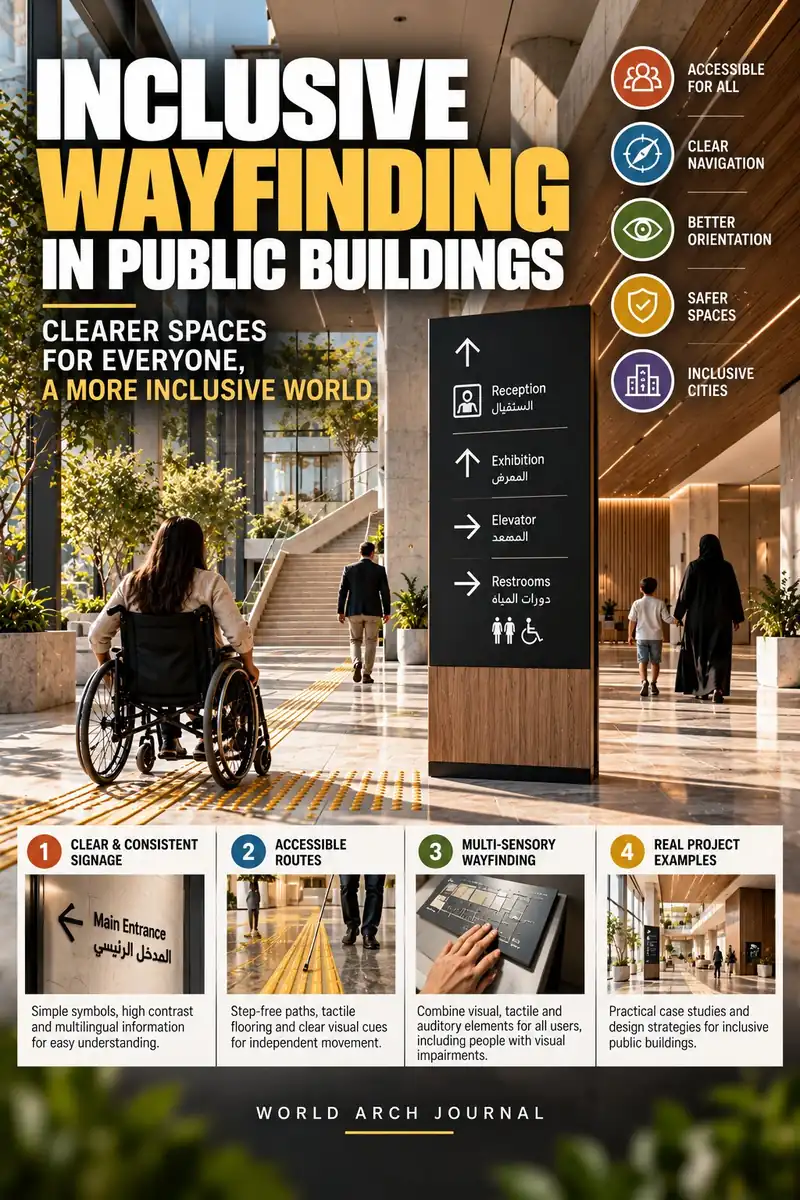
Good wayfinding is built into the route, thresholds, landmarks and information hierarchy—not solved by adding a sign at every junction. A practical guide for inclusive civic, cultural and public interiors.
By World Arch Journal ·
Project file
- FORMAT: Evidence-led international public-building guide
- PRIMARY KEYWORD: Inclusive wayfinding design
- SECONDARY KEYWORDS: Public building navigation · accessible signage · legible routes
- SEARCH INTENT: Spatial planning · signs · user testing
- AUTHOR: World Arch Journal
- PUBLISHED: 11 October 2026
- VISUAL MIX: 1 AI-assisted editorial image · 3 original diagrams
People experience a building as a journey, not a sign schedule. They arrive from a street or transit stop, cross the threshold, understand where they are, choose a route, find a destination and get back out. If the plan is confusing, another arrow may help only briefly. Inclusive wayfinding begins with a legible spatial structure and makes essential information available in more than one useful form.
This article is for public-facing buildings—libraries, museums, clinics, campuses, civic halls, transport interchanges and cultural spaces. It complements, but does not replace, the detailed technical requirements of local accessibility and life-safety codes. Laws vary by jurisdiction and the sensory, cognitive and mobility needs of users are not interchangeable.
Start with the route, not the sign
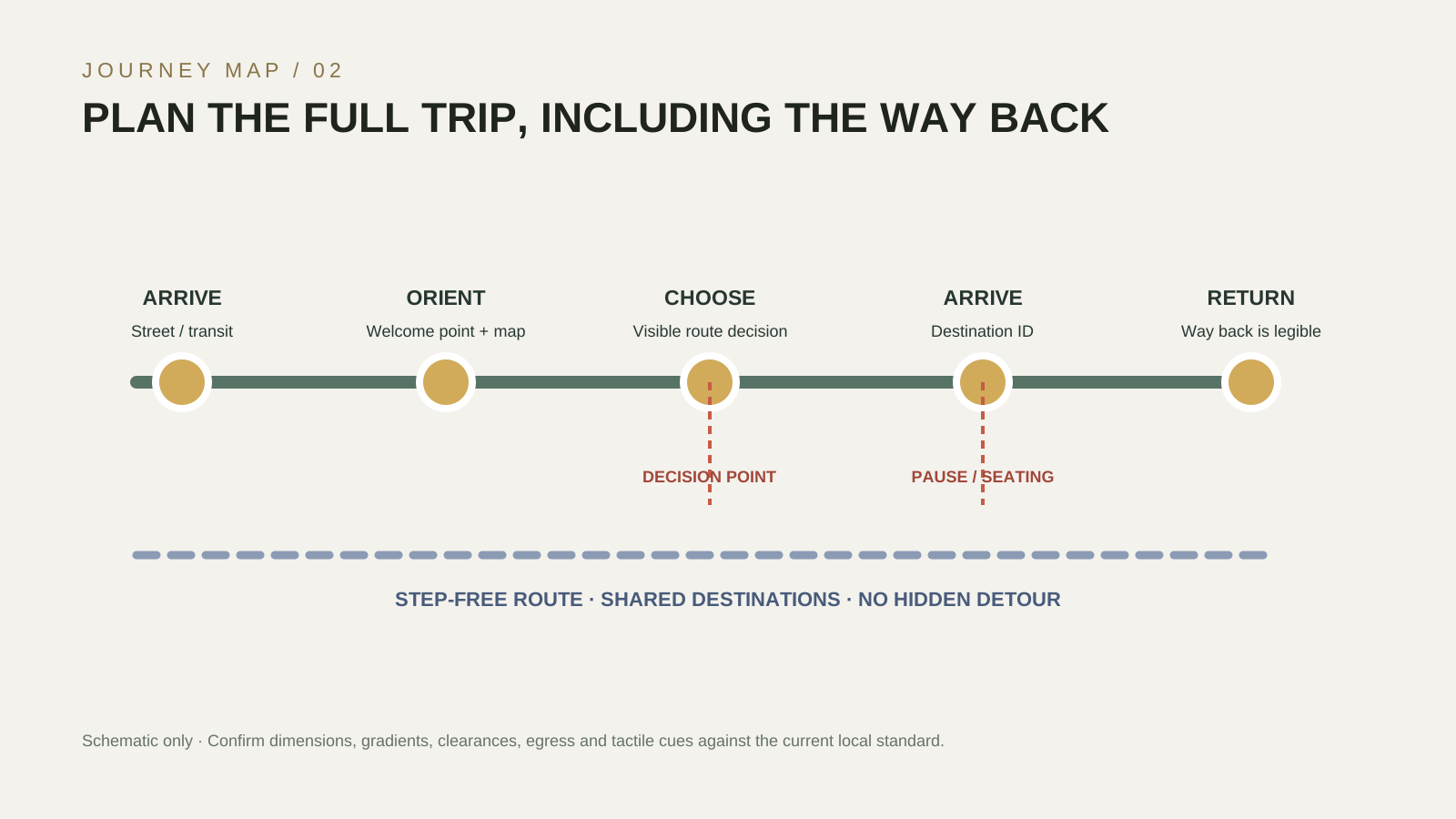
Before drawing signs, map likely journeys: arrival to reception; entrance to a public service; elevator to a department; accessible toilet; quiet space; emergency exit; and return to the entrance. Include step-free routes, seating and places to pause. Make the main route visible and direct. Separate public circulation from staff-only areas without making visitors guess which door is usable.
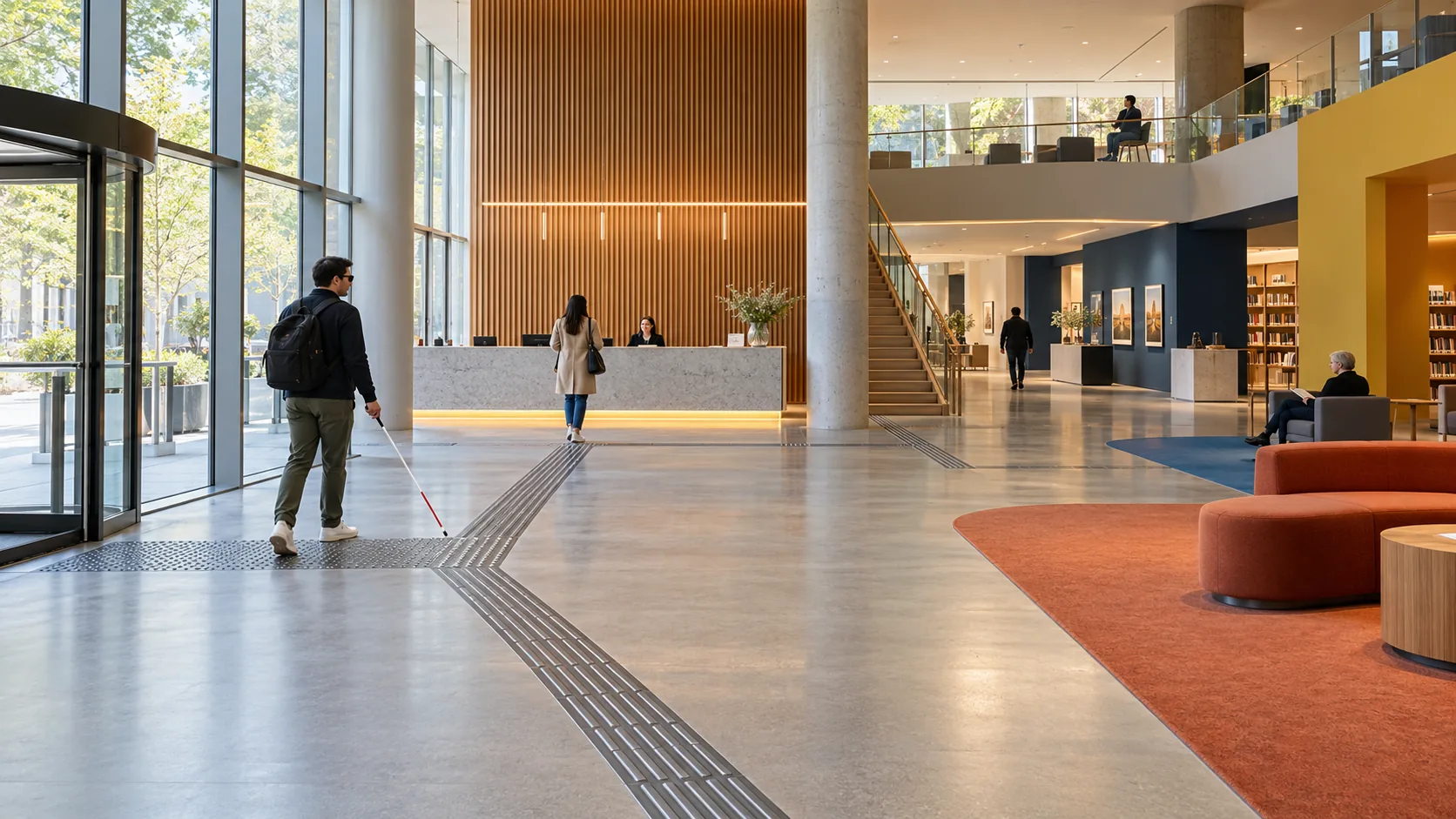
Then test the plan as a sequence of decisions. Where does a first-time visitor need to choose? Can they see a destination, a recognisable landmark or the next zone from that point? Does a long corridor have a meaningful end? Can someone using a wheelchair reach the same public destinations without an unnecessarily indirect detour? Does a person with low vision encounter a consistent edge, tonal contrast or tactile cue?
England’s 2026 Building for a Healthy Life guidance recommends a clear, legible movement network, strong landmarks and features that support navigation for people with visual, mobility or cognitive limitations. It is neighbourhood and placemaking guidance, not an interior-building code, but its core idea translates well: spatial hierarchy and identity can do useful wayfinding work before signs are added.
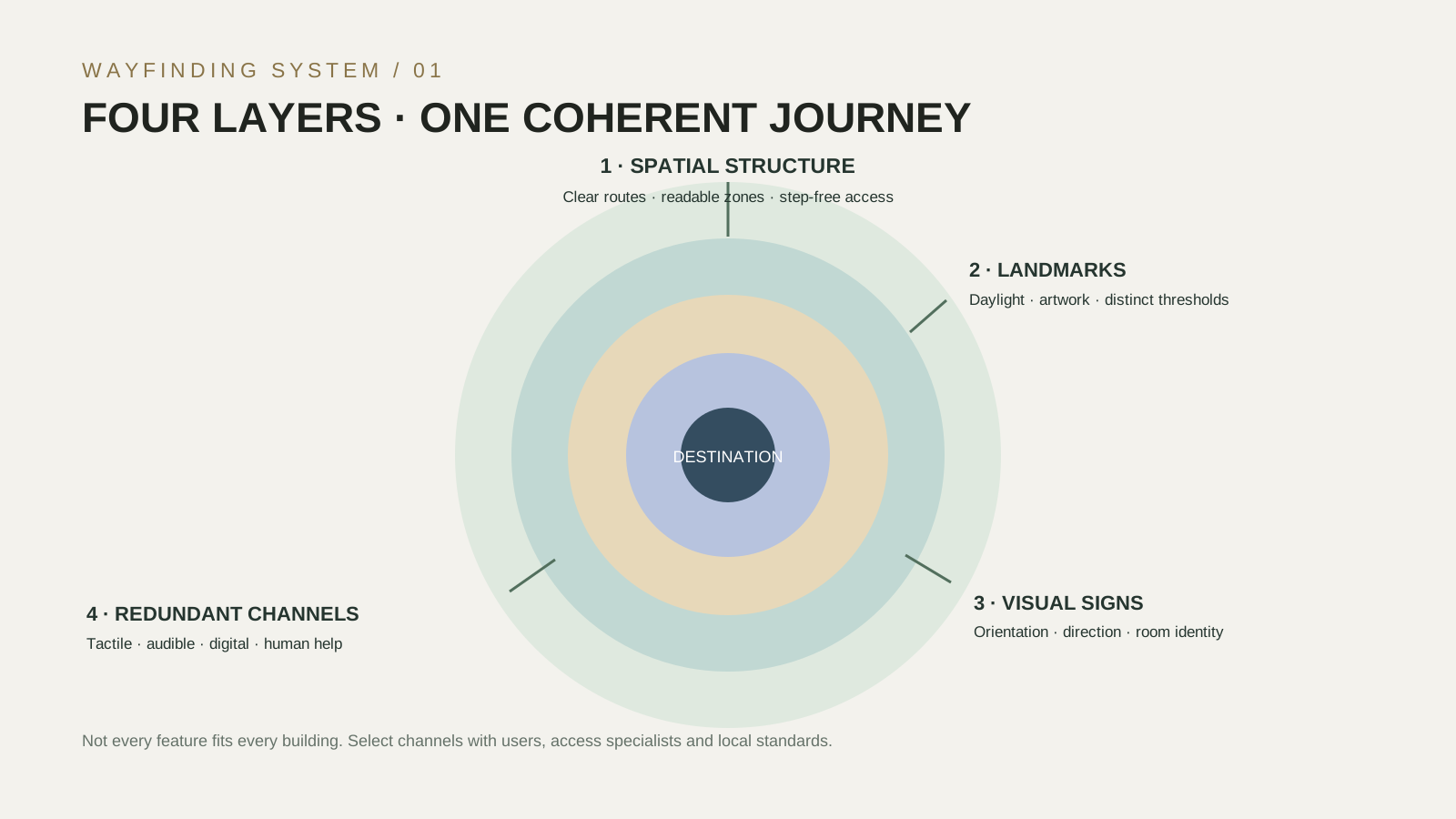
Four layers of inclusive wayfinding
1. Spatial structure
Give visitors a readable mental map: a clear entrance, an orientation point, simple route choices and recognisable zones. Keep primary circulation distinct from secondary paths. Avoid unnecessary changes of level, ambiguous corridors and public routes that repeatedly pass service doors. Where complexity cannot be removed, reveal the next step early and give users a reliable place to re-orient.
2. Landmarks and environmental cues
Distinctive stair volumes, courtyards, daylight, artwork, changes in ceiling form or a carefully chosen material can help people recognise where they are. Use cues consistently and avoid relying on colour alone. A landmark should be visible from the route, memorable without being visually overwhelming, and positioned so it does not obstruct circulation or create glare.
3. Signs and visual information
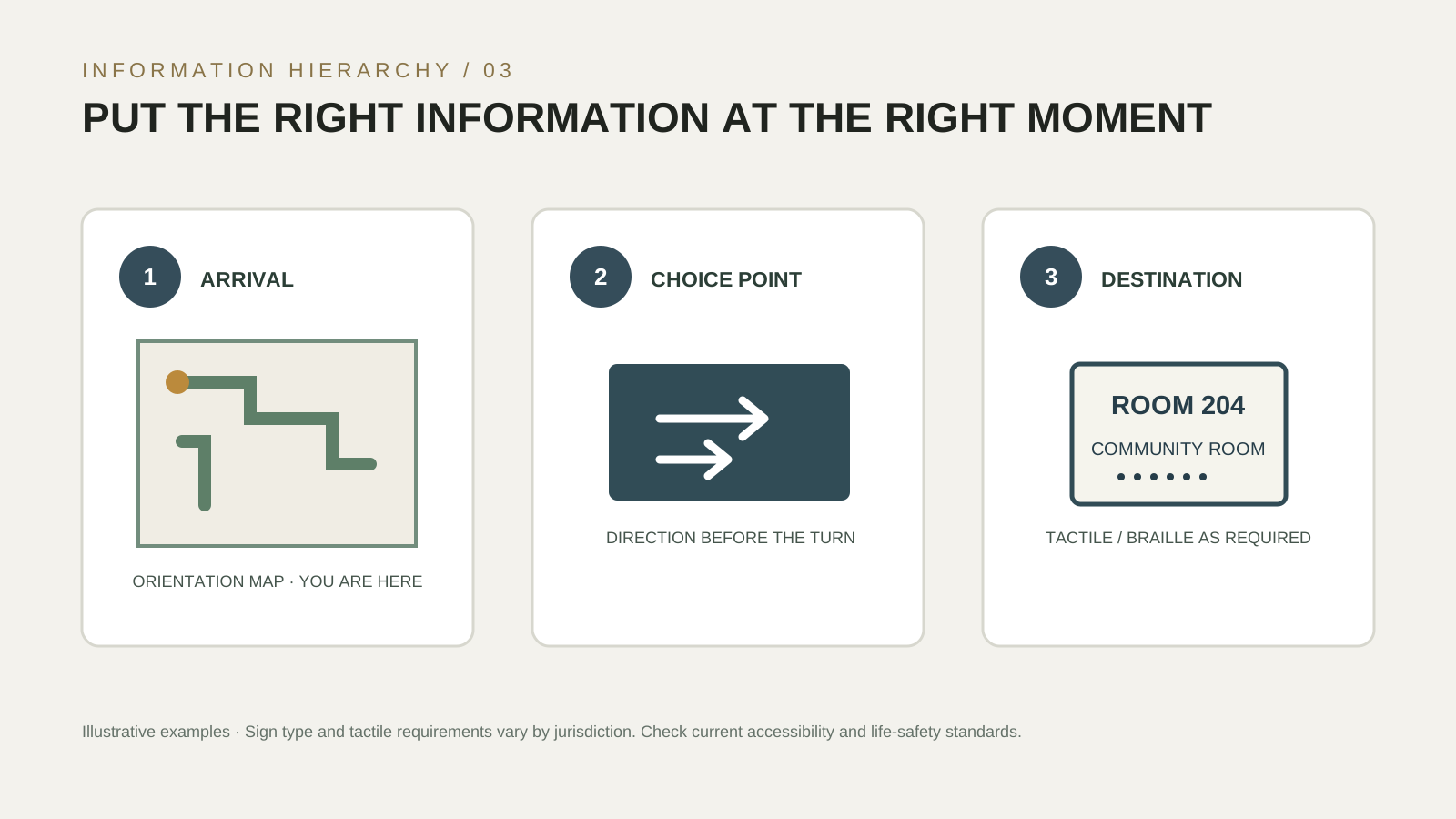
Use a hierarchy: an orientation map at arrival, directional signs at decision points, and concise room-identification signs at destinations. Place information before the visitor must choose, not after a wrong turn. Maintain consistent wording, arrows, naming and typography. Use legible type, simple language, non-glare finishes and strong light-dark contrast. The U.S. Access Board ADA guide distinguishes tactile identification signs for permanent rooms from directional and informational signs, which have visual requirements but are not generally required to be tactile under that standard. Do not generalise these U.S. rules as international law.
4. Tactile, audible and digital support
Where required, permanent room identifiers need raised characters and Braille under the applicable standard. Tactile floor indicators, audible announcements, hearing support, printed maps and digital navigation can add useful channels, but only when they are integrated, maintained and usable in context. A phone app must not be the only way to find a public service. Keep essential route information available offline and provide a human help point where appropriate.
Design decision points and landmarks
Every junction asks a visitor to interpret space. Reduce the number of equally plausible options. Make route hierarchy visible through width, ceiling, light, floor finish or aligned sightlines, and confirm it with concise signs. If two corridors appear identical, introduce a meaningful distinction at the spatial scale—such as a named zone, visible destination or consistent landmark—rather than depending on a small sign to carry the full burden.
Colour and symbols can support recognition, but they must be tested for contrast, cultural meaning and reproduction across materials. Do not encode the only difference in hue. Consider people with low vision, colour-vision differences, limited literacy, visitors using translation and people processing information under stress. Pair a colour-coded zone with a name, a clear symbol and consistent spatial cues.
At a large facility, use the same place names everywhere: maps, signs, staff language, web pages and appointment information. Avoid switching between a formal department name and a local nickname. Provide a “you are here” map that is correctly oriented to the viewer and easy to update when the building changes.
Test complete journeys with users
Review the design with people who have different mobility, sensory and cognitive experiences, as well as first-time visitors and staff. Ask them to complete real tasks: find the accessible entrance, reach a destination, locate a toilet and return to reception. Observe where they stop, turn back, ask for help or miss a threshold. Do not coach participants through the route; the point is to reveal where the system stops communicating.
Test from multiple approaches and at different operating conditions: daylight and evening, busy and quiet periods, temporary queues, open and closed doors, seasonal displays and construction diversions. Check that signs are not hidden behind people, furniture or door swings. Validate tactile information and reach ranges against the governing code with qualified access professionals.
After opening, keep a route audit and a change-control process. A new reception desk, tenant, exhibit or locked door can make a previously clear route fail. Assign an owner for sign updates, digital content, lighting, tactile elements and temporary wayfinding. Inclusive navigation is an operational service, not a one-time graphics package.
A practical project checklist
- Draw the journey: arrival, orientation, destination, accessible alternative and return.
- Reduce ambiguity: simplify routes, identify public paths and reveal choices ahead of decision points.
- Build spatial identity: use memorable landmarks, clear zones and consistent names.
- Set the information hierarchy: orientation, direction, room identification, emergency and temporary notices.
- Provide redundant channels: visual, tactile, audible and digital where appropriate and required.
- Check inclusion and compliance: consult users and access specialists; verify the current local code and life-safety rules.
- Plan upkeep: assign responsibility for signs, routes, announcements, maps and construction changes.
The strongest wayfinding system is often quieter: fewer but better decisions, a route that makes sense, and information that arrives before uncertainty. Signs matter, but their job is to reinforce an understandable building—not compensate for one that refuses to explain itself.
Continue exploring: access is a design brief, not an afterthought — our 7 October briefing asks who gets to learn, build and enter, and the September analysis Beyond the Render examines what public buildings owe the people who use them. The residential counterpart — homes that stay usable across a lifetime — is our universal design homes guide.
Frequently asked questions
What is inclusive wayfinding in architecture?
It is the coordinated design of routes, landmarks and information so people with different sensory, mobility and cognitive needs can understand where they are, choose a route and reach destinations.
Should every directional sign include Braille?
Requirements depend on jurisdiction and sign type. For example, the U.S. ADA Standards require tactile characters and Braille for specified permanent room and space identifiers, while directional signs are generally visual under the cited guide. Confirm local rules.
Can colour alone be used to identify building zones?
It should not carry the only identifying information. Pair colour with names, symbols, spatial cues and sufficient contrast so visitors are not dependent on hue alone.
When should wayfinding be tested?
During design development and after opening, with first-time visitors and people with varied access needs completing real journeys in realistic operating conditions.
What are the principles of wayfinding design?
Plan the route before the signs: a legible plan people can read at a glance; landmarks that confirm position; consistent decision points where information arrives before the turn, not after; layered information — visual, tactile and audible — that never relies on colour alone; and testing with first-time users, including people with access needs.
Why is wayfinding important in public buildings?
Because independence is access. Clear routes let every visitor — including blind, low-vision, neurodivergent and first-time users — reach services without asking for help, reduce missed appointments and crowding at information desks, and make evacuation calmer and safer.
Evidence and source notes
- U.S. Access Board — Explains ADA sign requirements, including tactile and Braille requirements for specified permanent room identifiers and visual requirements for directional and information signs.
- Homes England / UK Government — The 2026 England placemaking toolkit recommends legible movement networks, clear landmarks and navigation support for people with visual, mobility or cognitive limitations.
- Department for Transport / UK Government — Inclusive Mobility provides guidance on making transport and pedestrian environments more accessible, supporting continuity across journeys.
- Royal National Institute of Blind People — Accessible Building Design provides design guidance relevant to visibility, contrast and inclusive environments for blind and partially sighted people.
Related architecture stories
- Universal Design Homes: An Ageing-in-Place Guide
An age-friendly home should not look institutional. The strongest universal-design decisions are quiet: one continuous route, adaptable rooms, clear controls, safe light and details that preserve choice.
- Loft Conversion Handbook: Types, Headroom, Stairs, Planning and Costs
Most UK pitched-roof houses can gain a loft room, but only when ridge height, roof structure and a compliant stair all line up at once.
- Insulating Solid Walls from Inside: Breathable Materials, Damp Risks and What It Costs
Internal wall insulation works when the wall is dry, the vapour strategy matches the masonry, junctions are detailed and ventilation is improved at the same time.
📌 Never miss a story — add World Arch Journal as your preferred source on Google: https://www.google.com/preferences/source?q=worldarchjournal.com